Gutscheinbedingungen

*Gültig bis 05.07.2026 auf (fast) alles. Ausgeschlossen sind Smartboxen, Zeitschriften, Tickets, Lebensmittel, Gaming-Elektroartikel, Tinte/Toner, Gutscheine, Geschenkkarten, Blumen und Abos | Einlösbar in allen Buchhandlungen von Orell Füssli, Barth Bücher, Buchladen Rapunzel, Papeterie Köhler, Schuler Orell Füssli, Stauffacher und ZAP unter Vorweisung des Gutscheins, auf www.orellfüssli.ch durch Eingabe des Gutscheincodes. Beim Service „eBooks verschenken“ und bei eBook-Käufen via eReader nicht einlösbar | Mindesteinkaufswert: Fr. 30.- | Nicht mit anderen Rabatten kumulierbar.

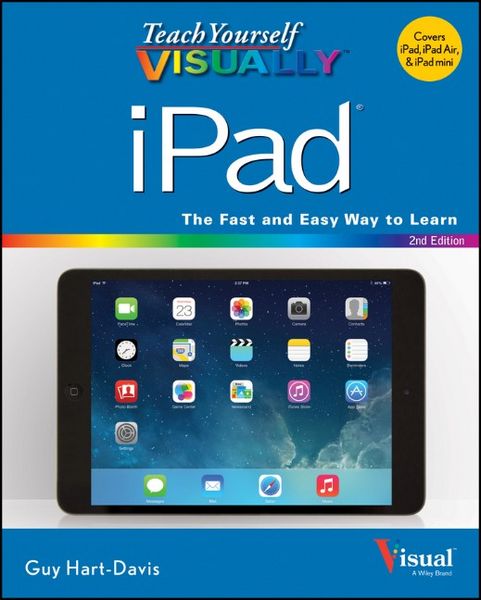
Produktbild: Teach Yourself Visually Ipa-2e

Teach Yourself Visually Ipa-2e

Fr. 41.90

inkl. gesetzl. MwSt., Versandkostenfrei


Beschreibung

Produktdetails

Einband

Taschenbuch

Erscheinungsdatum

31.12.2013

Verlag

John Wiley & Sons Inc

Seitenzahl

352

Maße (L/B/H)

23.5/18.7/1.9 cm

Gewicht

798 g

Auflage

2. Auflage

Sprache

Englisch

ISBN

978-1-118-71650-2

Beschreibung

Produktdetails

Einband

Taschenbuch

Erscheinungsdatum

31.12.2013

Verlag

John Wiley & Sons Inc

Seitenzahl

352

Maße (L/B/H)

23.5/18.7/1.9 cm

Gewicht

798 g

Auflage

2. Auflage

Sprache

Englisch

ISBN

978-1-118-71650-2

Noch keine Bewertungen vorhanden

Verfassen Sie die erste Bewertung zu diesem Artikel

Helfen Sie anderen Kundinnen und Kunden durch Ihre Meinung.

Kundinnen und Kunden meinen

Bewertungen (0)

Die Leseprobe wird geladen.
  • Produktbild: Teach Yourself Visually Ipa-2e
  • Chapter 1 Getting Started with Your iPad

    Take a Look at the iPad Air and iPad mini 4

    Unbox Your iPad and Charge It 6

    Turn On Your iPad and Meet Its Controls 8

    Download, Install, and Set Up iTunes 10

    Begin Setup and Activate Your iPad 12

    Set Up Your iPad as New Using iCloud 14

    Set Up Your iPad from an iCloud Backup 18

    Set Up Your iPad Using iTunes 20

    Choose Which Items to Sync from Your Computer 22

    Sync Your iPad with Your Computer via Wi-Fi 30

    Transfer Files Using iTunes File Sharing 32

    Explore the User Interface and Launch Apps 34

    Use Notification Center 36

    Use Control Center 38

    Chapter 2 Making Your iPad Work Your Way

    Find the Settings You Need 42

    Set Up iCloud 44

    Choose Which Apps Can Give Notifications 46

    Choose Sounds Settings 48

    Set Screen Brightness and Wallpaper 50

    Choose Privacy and Location Settings 52

    Configure Spotlight and Find What You Need 54

    Choose Locking and Control Center Settings 56

    Set Up and Use Do Not Disturb Mode 58

    Secure Your iPad with a Passcode Lock 60

    Configure Restrictions and Parental Controls 62

    Choose Date, Time, and International Settings 64

    Set Up Your Social Networking Accounts 66

    Install a Configuration Profile 68

    Accessorize Your iPad 70

    Chapter 3 Working with Voice and Accessibility

    Give Commands with Siri 74

    Dictate Text Using Siri 76

    Gather and Share Information with Siri 78

    Configure Siri to Work Your Way 80

    Use VoiceOver to Identify Items On-Screen 82

    Use Other Accessibility Features 84

    Use Your iPad in Your Car 86

    Chapter 4 Setting Up Communications

    Set Up Your Mail Accounts 90

    Set Up an Exchange Server Account 92

    Set a Default Account and Create Signatures 94

    Choose How Your iPad Gets Your E-Mail 96

    Control How Your iPad Displays Your E-Mail 98

    Organize Your E-Mail Messages by Threads 100

    Use the VIP Inbox 102

    Choose How Your iPad Displays Your Contacts 104

    Choose Alert Options for Calendar Events 106

    Choose Your Default Calendar and Time Zone 108

    Set Your Default Account for Notes 110

    Chapter 5 Networking and Communicating

    Control Wi-Fi, Bluetooth, and Cellular Access 114

    Connect Bluetooth Devices to Your iPad 116

    Control Cellular Data and Background Refresh 118

    Connect Your iPad to a Different Carrier 120

    Connect Your iPad to a Different Access Point 121

    Share Items via AirDrop 122

    Share Your iPad's Internet Access 124

    Connect to Wi-Fi Networks 126

    Log In to Wi-Fi Hotspots 128

    Connect to a Network via VPN 130

    Send Instant Messages 132

    Manage Your Instant Messages 134

    Share Your Updates Using Twitter 136

    Post Updates on Facebook 138

    Chat Face to Face Using FaceTime 140

    Chapter 6 Working with Apps

    Customize the Home Screen 144

    Organize Apps with Folders 146

    Switch Quickly from One App to Another 148

    Find the Apps You Need Using Your iPad 150

    Find the Apps You Need Using Your Computer 152

    Update and Remove Apps 154

    Manage Automatic Downloads and Your Apple ID 156

    Install an App Provided by an Administrator 158

    Cut, Copy, and Paste Text 160

    Bold, Italicize, Underline, and Replace Text 162

    Chapter 7 Browsing the Web and Sending E-Mail

    Browse the Web with Safari 166

    Access Websites Quickly with Your Bookmarks 168

    Create Bookmarks to Access Pages Easily 170

    Keep a Reading List of Web Pages 172

    Share Web Pages with Others 174

    Configure Your Default Search Engine 176

    Fill In Forms Quickly with AutoFill 178

    Tighten Up Security in Safari 180

    Read Your E-Mail Messages 182

    Reply To or Forward an E-Mail Message 184

    Organize Your Messages in Mailbox Folders 186

    Write and Send E-Mail Messages 188

    View Files Attached to Incoming E-Mail Messages 190

    Search for E-Mail Messages 192

    Chapter 8 Keeping Your Life Organized

    Browse or Search for Contacts 196

    Create a New Contact 198

    Share Contacts via E-Mail and Messages 200

    Browse Existing Events in Your Calendars 202

    Create New Events in Your Calendars 204

    Work with Calendar Invitations 206

    Keep Track of Your Commitments with Reminders 208

    Chapter 9 Playing Music, Videos, and Games

    Play Back Music Using the Music App 214

    Play Back Videos Using the Videos App 216

    Play Music and Videos Using AirPlay 218

    Create a Playlist with the Music App 220

    Create a Genius Playlist 222

    Configure iPad Audio Settings 224

    Listen to iTunes Radio 226

    Enjoy Podcasts 230

    Learn with iTunes U 232

    Sign In to Game Center 234

    Add and Play Games with Game Center 236

    Add Friends and Play Games with Them 238

    Chapter 10 Working with Photos and Books

    Browse Photos Using Years, Collections, and Moments 242

    Browse Photos Using Streams 244

    Browse Photos Using Albums 246

    Create Albums 248

    Share Photos Using My Photo Stream 250

    Share Photo Streams with Other People 252

    Share Photos via E-Mail and Messaging 254

    Play Slide Shows of Photos 256

    Read Digital Books with iBooks 258

    Browse and Buy Digital Books with iBooks 260

    Add PDF Files to iBooks and Read Them 262

    Chapter 11 Using Maps and Clock

    Find Your Location with the Maps App 266

    Find Directions with the Maps App 268

    Explore with 3D Flyovers 270

    Use the Maps App's Bookmarks and Contacts 272

    Share a Location with Others 274

    Set Alarms 276

    Use the Stopwatch and Timer 278

    Set Up Clocks in Multiple Locations 280

    Chapter 12 Taking Photos and Videos

    Take Photos with the Camera App 284

    Take Square Photos and Use the Grid 286

    Take Fun Photos with Photo Booth 288

    Rotate Photos 290

    Enhance Photos 291

    Apply Filters to a Photo 292

    Reduce Red-Eye in Photos 294

    Crop and Straighten Photos 295

    Capture Video 296

    Edit Your Videos with the Trim Feature 298

    Share Your Photos and Videos 300

    Chapter 13 Troubleshooting Your iPad

    Close an App That Has Stopped Responding 304

    Update Your iPad Software 306

    Extend the Runtime of Your iPad Battery 308

    Back Up and Restore Your iPad Using iTunes 310

    Back Up and Restore Your iPad Using iCloud 312

    Reset Your Network, Dictionary, and Home Screen 314

    Restore Your iPad Operating System Using iTunes 316

    Restore Your iPad to Factory Settings 318

    Troubleshoot Wi-Fi Connections 320

    Resolve iTunes Connection and Sync Problems 322

    Locate Your iPad with Find My iPad 324

    Index 328